Create PLCopen Axis
 A vendor -and product- independent worldwide association active in Industrial Control and aiming at standardizing PLC file formats based on XML axis, follow these steps:
- In the Project Explorer, right-click on the PLCopen item and select the New Axis command in the menu
- Fill in the PLCopen Axis Data dialog
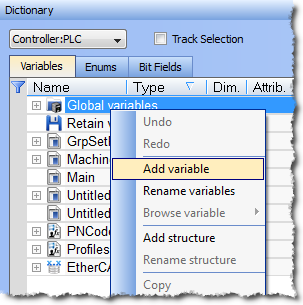
- In the Dictionary, right-click on the Global variables node and select the Add variable command in the menu.
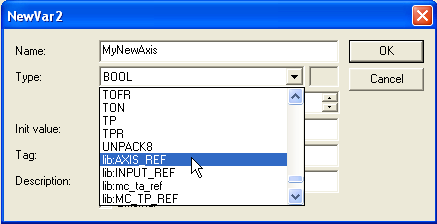
- Create a new instance of the AXIS_REF data structure
-
-
The name must be the same as the Name field defined in the PLCopen Axis Data dialog. The KAS IDE
"Integrated development environment"
An integrated development environment is a type of computer software that assists computer programmers in developing software.
IDEs normally consist of a source code editor, a compiler and/or interpreter, build-automation tools, and a debugger already contains the AXIS_REF data structure when you choose the PLCopen motion engine. - Then, this Axis Name (MyNewAxis in our example) is an instance of an AXIS_REF library function that can be used in your PLC"Programmable Logic Controller"
A Programmable Logic Controller, PLC, or Programmable Controller is a digital computer used for automation of industrial processes, such as control of machinery on factory assembly lines.
Used to synchronize the flow of inputs from (physical) sensors and events with the flow of outputs to actuators and events programs
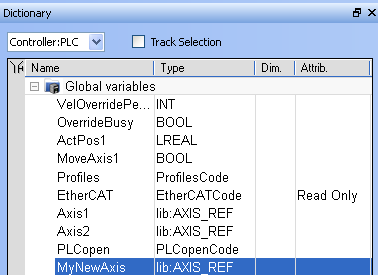
Figure 5-18: PLCopen Axis - New Instance of AXIS_REF
-
-
- In FFLD, the Copy function block is needed to load the Axis Number (defined in the PLCopen Axis Data dialog) into the new data structure.
- In ST"Structured text"
A high-level language that is block structured and syntactically resembles Pascal, use a statement (Example: Axis10.AXIS_NUM := 10; )
|
Stay Connected with Kollmorgen       
|
Copyright © 2018 Kollmorgen |

|